
Introduction
Odoo 19 introduces groundbreaking AI capabilities that transform how businesses manage their daily operations. Unlike typical AI solutions that promise to replace entire teams, Odoo's approach focuses on practical, purpose-driven features that enhance existing workflows without overwhelming users.
Key AI Features in Odoo 19
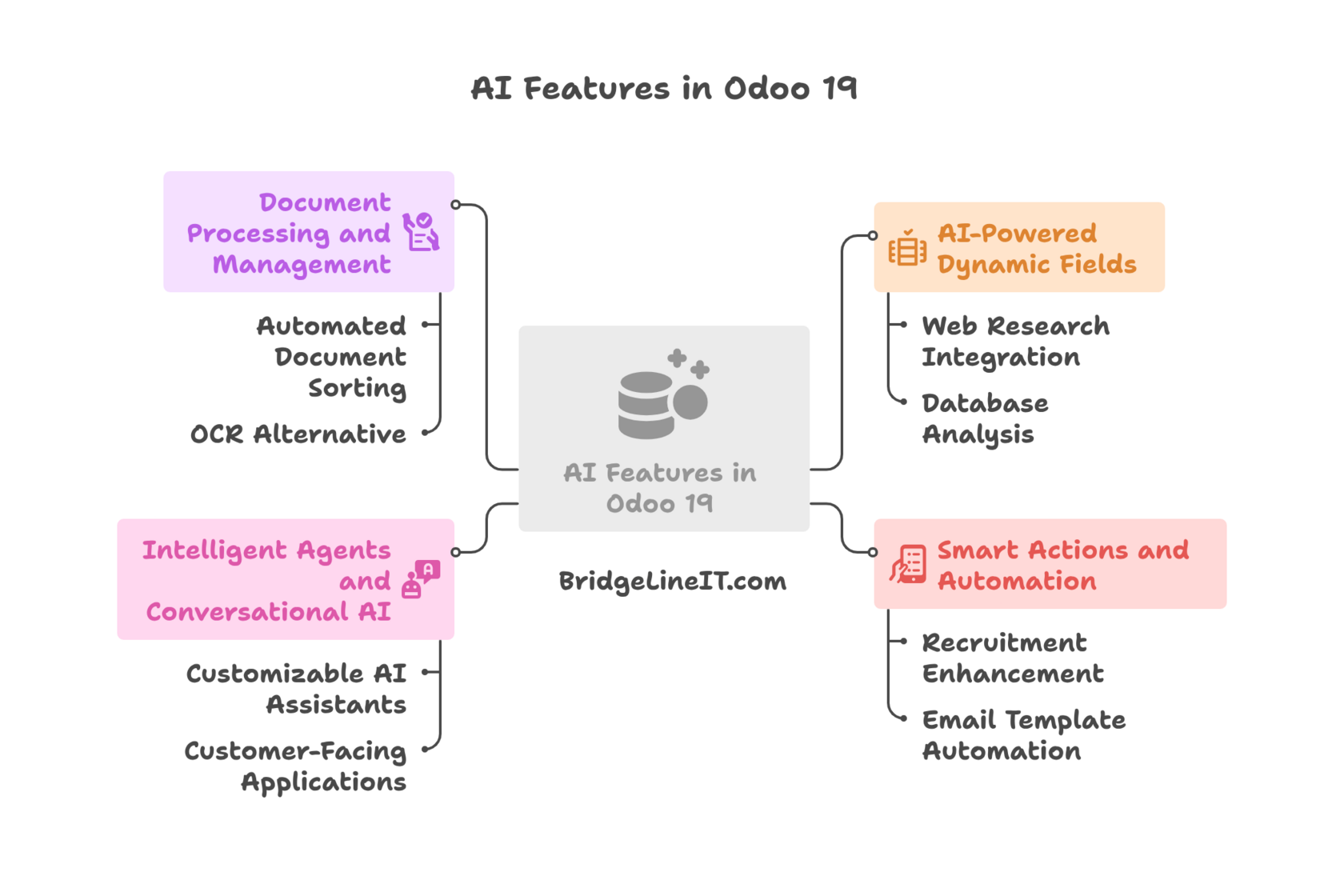
Visual overview of Odoo 19's four core AI feature categories.
This mind map illustrates the comprehensive AI capabilities in Odoo 19, organized into four main areas: AI-Powered Dynamic Fields (web research integration, database analysis), Smart Actions and Automation (recruitment enhancement, email template automation), Intelligent Agents and Conversational AI (customizable AI assistants, customer-facing applications), and Document Processing and Management (automated document sorting, OCR alternative). Each category represents practical business automation tools designed to streamline operations and enhance productivity. Source: BridgeLineIT.com
1. AI-Powered Dynamic Fields
One of Odoo 19's most powerful features is the ability to create fields that automatically populate using AI. This functionality works through Studio and can be implemented in two ways:
Web Research Integration
- Company Intelligence: Automatically retrieve employee headcount, revenue data, and company information
- Market Research: Gather competitive intelligence and industry insights
- Social Media Analysis: Monitor LinkedIn activity and posting patterns
Database Analysis
- Purchase History Analysis: Generate executive summaries from sales order data
- Trend Identification: Discover patterns in customer behavior
- Relationship Insights: Analyse collaboration opportunities
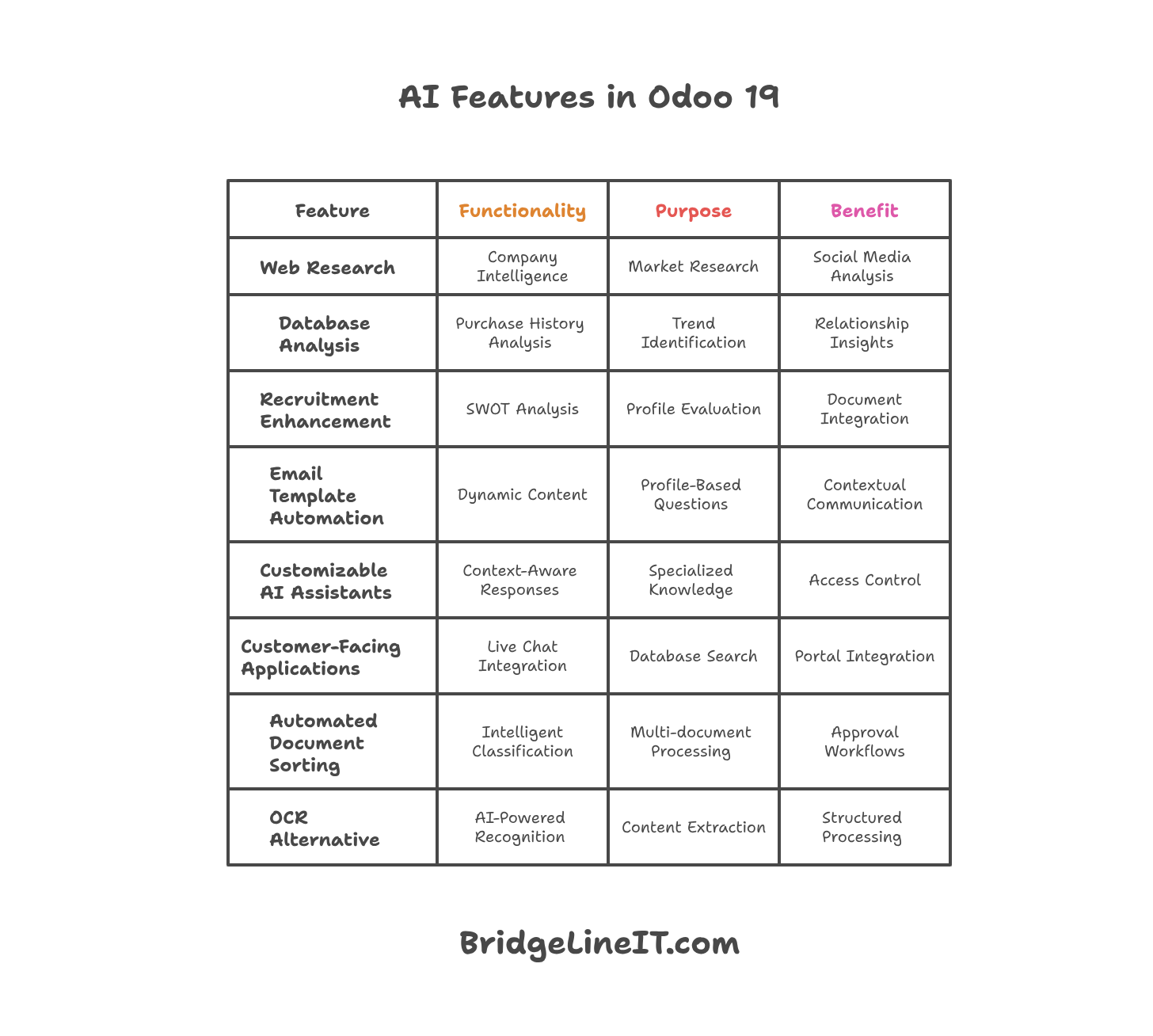 Complete overview of Odoo 19 AI features and capabilities. This infographic details eight major AI functionalities, including web research for company intelligence, database analysis for trend identification, recruitment SWOT analysis, email template automation, customizable AI assistants with access control, customer-facing live chat integration, automated document sorting with approval workflows, and AI-powered recognition as an OCR alternative. Source: BridgeLineIT.com
Implementation: Fields utilise dynamic placeholders (/field) that inject database information into prompts, enabling them to work automatically across all records.
2. Smart Actions and Automation
Recruitment Enhancement
- SWOT Analysis: Automatically generate candidate assessments from PDF resumes
- Profile Evaluation: Create structured analyses with key strengths and weaknesses
- Document Integration: Process attached files within prompts
Email Template Automation
- Dynamic Content: Generate personalised email content based on contact data
- Profile-Based Questions: Create tailored interview questions from candidate profiles
- Contextual Communication: Adapt messaging to specific recipient characteristics
3. Intelligent Agents and Conversational AI
Customizable AI Assistants
- Context-Aware Responses: Different prompts based on record type (leads, invoices, contacts)
- Specialised Knowledge: Upload custom documentation for domain-specific guidance
- Access Control: Respect user permissions when retrieving information
Customer-Facing Applications
- Live Chat Integration: Enable customers to query their order status
- Database Search: Natural language queries for internal users
- Portal Integration: Secure customer self-service capabilities
4. Document Processing and Management
Automated Document Sorting
- Intelligent Classification: Automatically categorise invoices, contracts, and legal documents
- Multi-document Processing: Handle collated PDFs with automatic splitting
- Approval Workflows: Create human-in-the-loop processes for high-value documents
OCR Alternative
- AI-Powered Recognition: Replace traditional OCR with advanced AI document processing
- Content Extraction: Automatically extract relevant data from various file formats
- Structured Processing: Convert unstructured documents into actionable database records
Real-World Implementation Examples
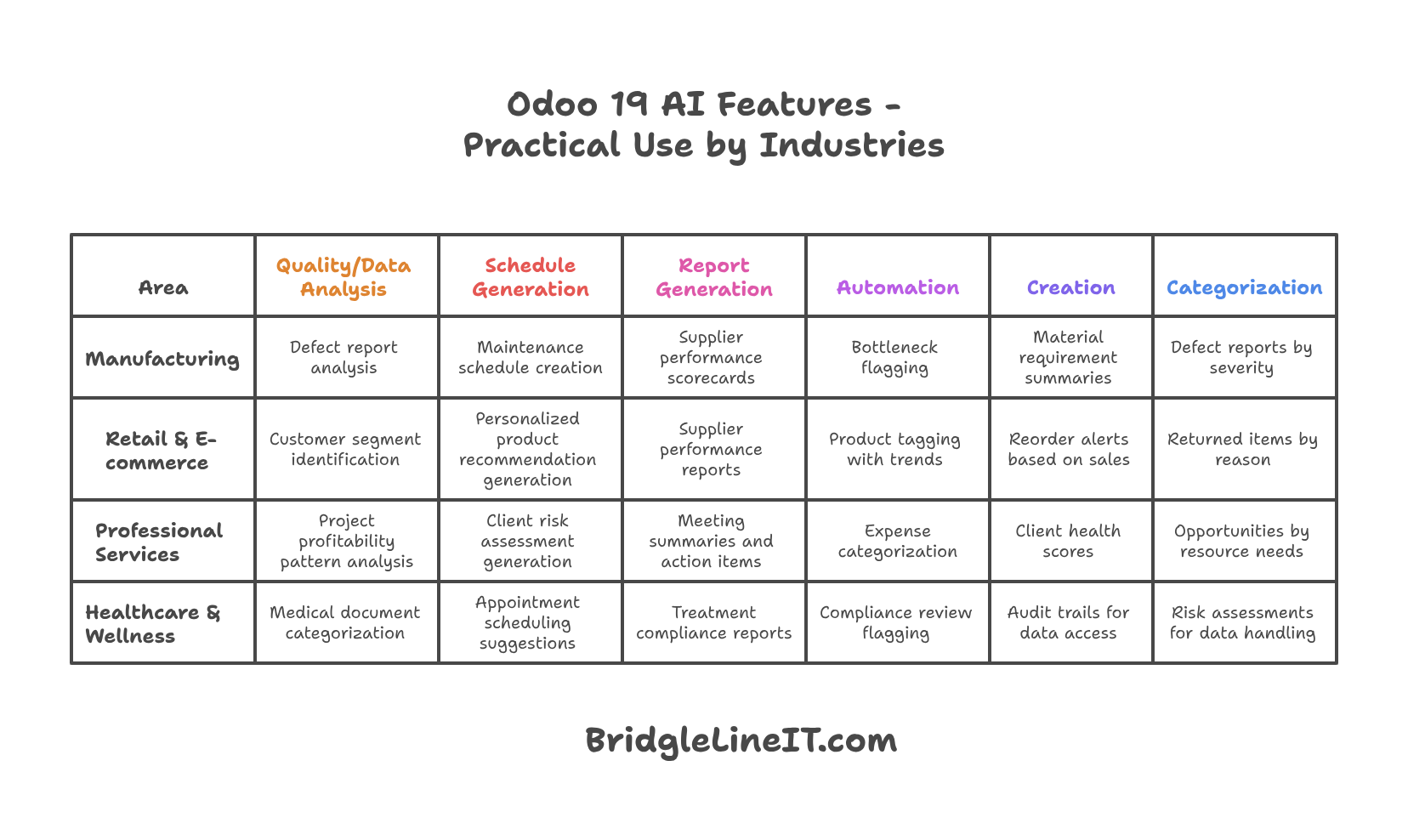 Industry-specific implementation guide for Odoo 19 AI features across four major business sectors. This comprehensive table demonstrates practical applications of AI automation in Manufacturing (defect analysis, maintenance scheduling, supplier scorecards), Retail & E-commerce (customer segmentation, product recommendations, supplier reports), Professional Services (project profitability analysis, client risk assessment, meeting summaries), and Healthcare & Wellness (medical document categorisation, appointment scheduling, treatment compliance). Each row demonstrates how the same AI capabilities can be adapted to address industry-specific challenges, ranging from quality analysis to automated categorisation. Source: BridgeLineIT.com
CRM Optimization
- Lead Translation: Instantly translate international inquiries
- Company Profiling: Automated research on potential clients
- Product Identification: Extract the mentioned products from the lead descriptions
- Smart Tagging: Automatic lead categorization (B2B/B2C, industry, size)
Financial Management
- Credit Risk Assessment: Automated scoring based on payment history
- Overdue Invoice Management: Natural language queries for outstanding payments
- Vendor Bill Processing: Intelligent invoice categorisation and approval routing
HR and Knowledge Management
- Policy Assistant: AI-powered HR chatbot with company policy knowledge
- Document Classification: Automatic sorting of employee documents
- Compliance Checking: Automated review against company guidelines
E-commerce Enhancement
- Product Catalogue Management: Automated tagging and categorisation
- Description Generation: AI-written product descriptions
- Category Assignment: Intelligent product classification for websites
Technical Implementation
Configuration Requirements
- API Keys: Support for ChatGPT and Gemini providers
- On-Premise Compatibility: Full functionality in self-hosted environments
- Access Rights: Maintains the existing Odoo security model
- Field Updates: Scheduled tasks with manual override options
Best Practices
- Prompt Engineering: Iterative refinement for optimal results
- Human Oversight: Maintain review processes for critical operations
- Incremental Implementation: Start small and scale based on success
- Process Analysis: Focus on time-saving opportunities
Privacy and Compliance
Data Handling
- GDPR Considerations: Data shared with AI providers requires appropriate contracts
- Access Control: AI respects existing user permissions
- Conversation Management: One-shot conversations prevent data mixing
- Security: Information retrieval limited to the user's access rights
Getting Started
Implementation Strategy
- Identify Pain Points: Focus on repetitive, time-consuming tasks
- Start Simple: Begin with basic field automation
- Test and Refine: Iterate on prompts for better results
- Scale Gradually: Expand to more complex workflows
- Train Teams: Ensure proper adoption and usage
Available Support
- Demo Environments: Trial access for testing features
- Technical Documentation: Comprehensive implementation guides
- Expert Consultation: Access to development team insights
- Community Resources: Shared prompts and use cases
Practical Use Cases by Industry
Manufacturing
Smart Quality Control
- Automatically analyse product defect reports and categorise them by severity
- Generate maintenance schedules based on equipment history patterns
- Create supplier performance scorecards using delivery and quality data
Production Planning
- Analyse historical demand patterns to suggest production schedules
- Automatically flag potential bottlenecks based on the order pipeline
- Generate material requirement summaries from multiple product orders
Retail & E-commerce
Customer Behaviour Analysis
- Identify customer segments based on purchase history patterns
- Generate personalized product recommendations for email campaigns
- Automatically tag products with seasonal trends and preferences
Inventory Optimization
- Create reorder alerts based on sales velocity analysis
- Generate supplier performance reports for procurement decisions
- Automatically categorise returned items by reason and resolution needed
Professional Services
Project Management
- Analyse timesheet data to identify project profitability patterns
- Generate client risk assessments based on payment and communication history
- Automatically categorise expenses by project and client type
Client Relationship Management
- Create client health scores based on interaction frequency and satisfaction
- Generate meeting summaries and action items from uploaded documents
- Automatically tag opportunities by complexity and resource requirements
Healthcare & Wellness
Patient Data Management
- Automatically categorise medical documents by speciality and urgency
- Generate appointment scheduling suggestions based on patient history
- Create treatment compliance reports from patient interaction data
Regulatory Compliance
- Automatically flag documents requiring compliance review
- Generate audit trails for patient data access and modifications
- Create risk assessments for data handling procedures
Potential Business Impact
Operational Efficiency Gains
Time Savings Metrics
- Document processing: 70-80% reduction in manual sorting time
- Data entry: 60-75% decrease in manual field completion
- Customer service: 50-65% faster response times with AI agents
- Lead qualification: 80-90% automation of initial lead scoring
Cost Reduction Areas
- Administrative overhead: 30-40% reduction in routine data processing
- Training costs: Decreased onboarding time for document management
- Error correction: 50-70% fewer data entry mistakes
- Compliance costs: Automated audit trail generation and document classification
Revenue Enhancement Opportunities
Sales Acceleration
- Faster lead qualification and routing to appropriate sales teams
- Improved customer insights leading to better conversion rates
- Automated follow-up generation reduces prospect abandonment
Customer Retention
- Proactive identification of at-risk customers through payment pattern analysis
- Personalised communication based on purchase history and preferences
- Faster resolution of customer service issues through intelligent ticket routing
Strategic Advantages
Data-Driven Decision Making
- Automated trend analysis providing actionable business insights
- Real-time risk assessment for financial and operational decisions
- Predictive analytics for inventory and resource planning
Competitive Positioning
- Enhanced customer experience through faster, more accurate service
- Improved operational agility through automated process optimisation
- Better compliance management reduces regulatory risks
Frequently Asked Questions (FAQ)
Technical Implementation
Q: Do I need separate AI subscriptions or credits to use Odoo 19 AI features? A: No, you only need your own API keys from supported providers (ChatGPT or Gemini). Odoo doesn't charge additional AI credits, but you'll pay the AI provider directly based on usage.
Q: Can I use Odoo 19 AI features in on-premise installations? A: Yes, all AI features work in on-premise environments. You'll need to configure your own API keys with the AI providers rather than using Odoo's shared keys.
Q: What happens if my AI provider is temporarily unavailable? A: AI-computed fields retain their last calculated values, and you can manually trigger recalculation when service resumes. Critical business processes won't be disrupted.
Q: How often are AI fields updated? A: By default, AI fields are updated through scheduled tasks. You can manually trigger updates at any time or configure more frequent automatic updates to suit your needs.
Data Privacy and Security
Q: What data is shared with AI providers? A: Only the specific data included in your prompts is shared. This includes field values you reference and any documents you process. Odoo respects your user access rights when sharing data.
Q: Is my data used to train AI models? A: This depends on your contract with the AI provider (OpenAI, Google). Most enterprise contracts include provisions that prevent the use of data for model training.
Q: Can I restrict which users can create or modify AI prompts? A: Yes, Odoo's standard access rights system applies to AI features. You can control who can create AI fields, modify prompts, or access certain data.
Q: What happens to conversation data in AI agents? A: Conversations are typically one-shot interactions that are deleted after completion to prevent data mixing. No persistent conversation history is maintained.
Customisation and Integration
Q: Can I use different AI models for different purposes? A: Yes, you can configure different agents with different models (GPT-3.5, GPT-4, Gemini variants) based on complexity needs and cost considerations.
Q: How do I ensure AI responses match my company's tone and style? A: Through prompt engineering and by uploading company-specific documentation to train your agents. You can specify writing style, terminology, and response formats in your prompts.
Q: Can I integrate AI features with external systems? A: AI features work within Odoo's ecosystem. External integration would require custom development or API connections, but AI can process data from integrated systems.
Q: Is there a limit to how complex my prompts can be? A: Prompt complexity is limited by the AI provider's token limits (typically 4,000-32,000 tokens depending on the model). Most business use cases work well within these limits.
Performance and Scaling
Q: How does AI feature performance scale with company size? A: Performance scales with your AI provider's capabilities and your usage patterns. Larger companies may want to consider premium AI service tiers or usage optimisation strategies.
Q: Can multiple users trigger AI processing simultaneously? A: Yes, AI requests are processed independently. However, heavy simultaneous usage may impact response times depending on your AI provider's rate limits.
Q: What's the typical response time for AI features? A: Simple field calculations: 2-5 seconds. Document processing: 10-30 seconds. Complex analysis: 30-60 seconds. Times vary based on prompt complexity and AI provider load.
Conclusion
Odoo 19's AI features represent a mature approach to business automation, focusing on practical applications that deliver immediate value. Rather than replacing human decision-making, these tools augment existing processes, reduce manual work, and provide intelligent insights that drive better business outcomes.
The key to success lies in thoughtful implementation, proper prompt engineering, and maintaining appropriate human oversight. Organisations that adopt these features strategically will see significant improvements in efficiency, accuracy, and overall productivity.
20.09.2025